How browser-based AI tool usage creates recoverable endpoint records that survive user deletion, and the regulatory implications for HIPAA, SOX, and attorney-client privilege.
Browser-based AI tools such as ChatGPT, Claude, and Microsoft Copilot generate local storage artifacts on Windows endpoints as a function of normal operation. These artifacts persist after a user deletes the conversation through the application interface. This document describes three artifact categories, their file locations, the technical reason each survives deletion, and the regulatory exposure each creates for organisations in regulated industries. Findings are reproducible on any standard Windows installation running a Chromium-based browser.
When an employee uses a browser-based AI tool, the browser automatically creates and maintains local storage artifacts to support performance, session continuity, and crash recovery. These artifacts are created without deliberate user action and are not removed by deleting the conversation within the application.
Standard endpoint security tooling does not surface these artifacts. Data Loss Prevention monitors defined egress channels — email, file uploads, removable media — and does not inspect browser form submissions over HTTPS or the local files those sessions generate. Endpoint Detection and Response monitors for malicious behaviour and does not flag legitimate browser activity. Enterprise AI governance dashboards capture activity on managed accounts and have no visibility into personal or unmanaged accounts.
The result is a category of data — the full content of what employees submitted to AI tools — that exists on the endpoint, is recoverable through standard forensic methods, and is invisible to the tools organisations rely on for compliance monitoring. Three artifact categories are documented below.
Chromium-based browsers maintain browsing history in a SQLite relational database. The urls table records each visited URL, page title, visit count, and last-visit timestamp in WebKit epoch format. The visits table records individual visit events. Visits to AI tool domains — chat.openai.com, claude.ai, copilot.microsoft.com, and others — are written automatically as part of normal browsing.
Clearing browser history through the browser interface removes records from the active database but does not guarantee secure overwriting of the underlying file. Records may remain recoverable using tools that read the raw database file rather than querying through the browser, including freed pages within the SQLite file structure.
Establishes that specific AI tool domains were accessed, the frequency of access, and the date range of usage. Does not capture conversation content.
This is the most forensically significant artifact category. IndexedDB is a browser API that web applications use to store structured data on the client device. Browser-based AI tools use IndexedDB to cache conversation data locally for performance and session continuity. Chromium implements IndexedDB using LevelDB, a key-value storage library built on a log-structured merge-tree architecture.
LevelDB writes operations to a write-ahead log, typically named with sequential numbering such as 000003.log. All operations — insertions and deletions alike — are appended sequentially to the end of this log. When a user deletes a conversation through the application interface, LevelDB does not remove the original data. It appends a deletion marker (a tombstone record) to the log. The original conversation content remains at its prior offset in the file. Tombstoned records are removed only during compaction, an asynchronous background process triggered by file size thresholds rather than by user deletion.
Recovers the content of AI tool conversations, including the full text of prompts submitted by the user, after interface-level deletion. This artifact determines what sensitive data was submitted to the AI tool.
Chromium browsers periodically serialise the state of open tabs to support crash recovery and session restoration. Files are written at intervals and at browser close, using Snappy compression and Protocol Buffer serialisation. Serialised state can include the URL, page title, and cached page content. For an AI tool session open at the time of serialisation, the captured tab state may include conversation content displayed in the browser at that moment. These files persist until a new browser session initialises successfully.
Captures AI tool session content at the time of browser close, independent of the History database and IndexedDB artifacts. Provides a corroborating record where other artifacts have been cleared.
The three artifact categories are created and maintained independently. Clearing browser history affects the SQLite database but not IndexedDB or session files. Deleting a conversation within the application affects the IndexedDB logical view but not the underlying log content, and does not affect session files. Full removal of evidence of an AI tool session requires deliberate, simultaneous clearing of all three artifact types — an action that does not occur through normal user behaviour or standard browser hygiene.
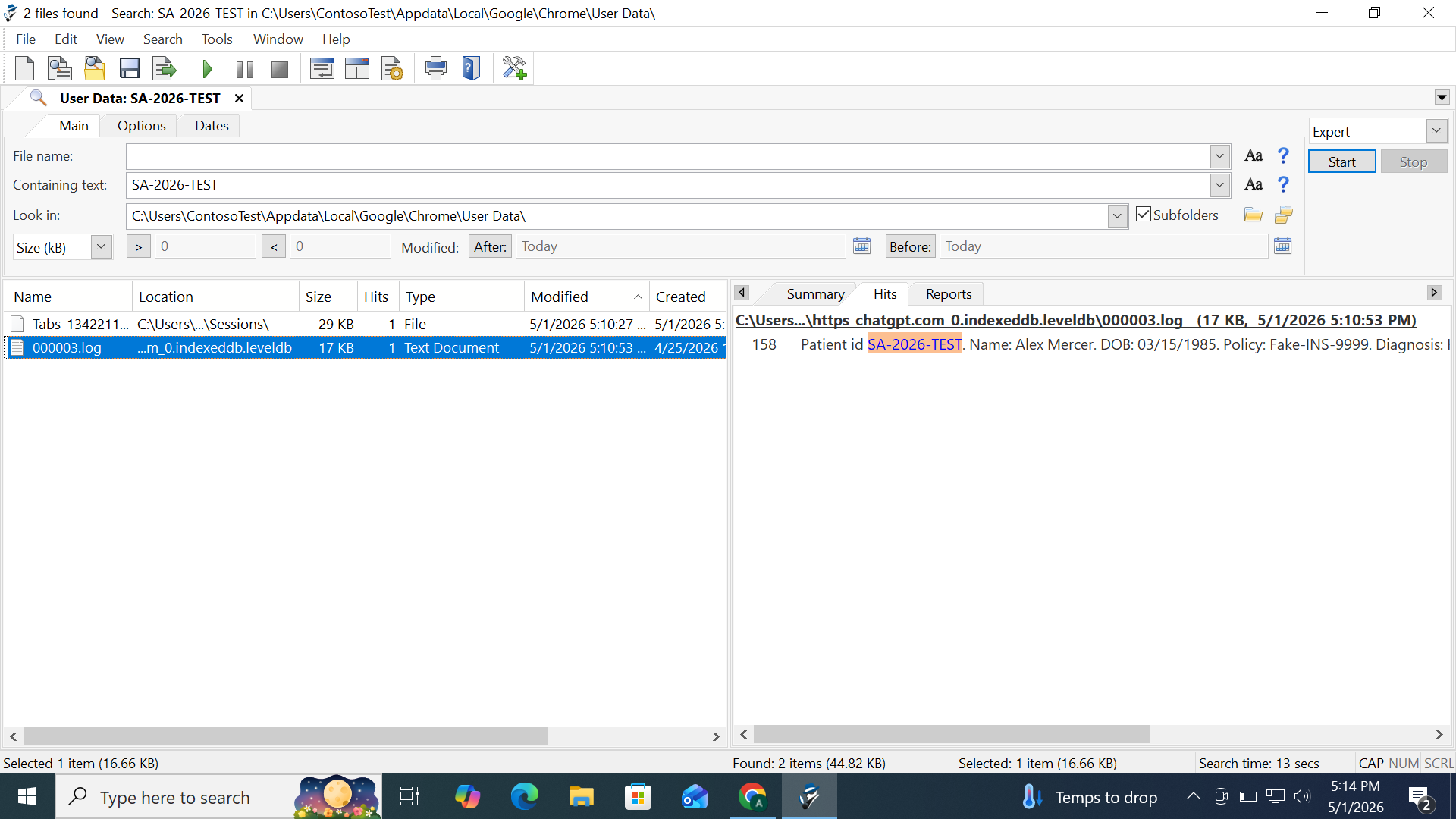
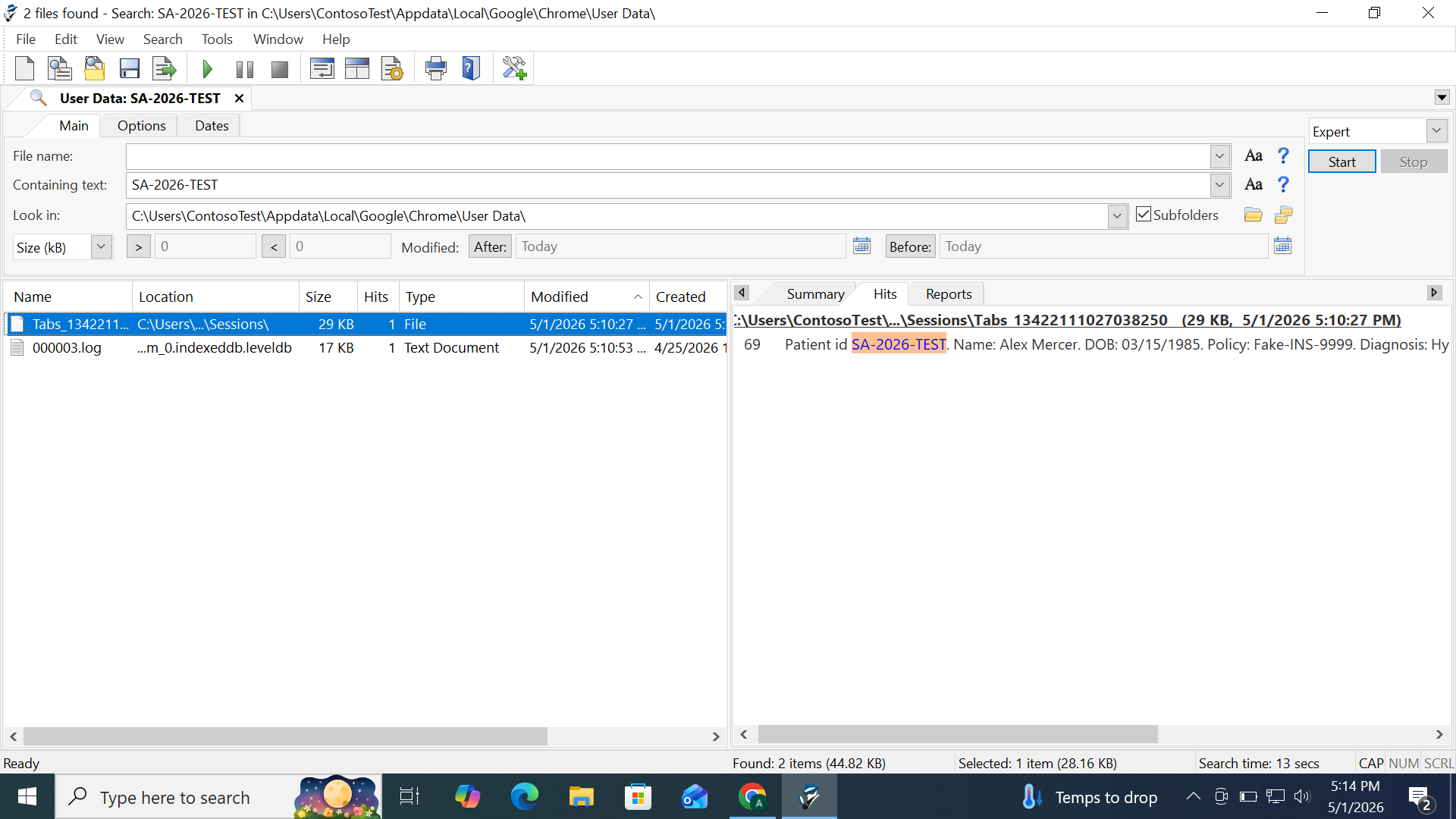
To validate the persistence behaviour described in Section 3, a controlled test was conducted. A unique synthetic patient record was submitted within a ChatGPT session in Google Chrome version 147.0.7727.137 (Official Build, 64-bit) on Windows 10, on 1 May 2026. The record used a fabricated patient ID (SA-2026-TEST) with a constructed name, date of birth, insurance number, and partial diagnosis — structured to resemble real PHI. The conversation was then deleted through the standard ChatGPT interface.
Following the deletion, the IndexedDB LevelDB directory was examined using a standard text editor. The test string was recovered from the 000003.log file at line 158 as readable text — the complete fabricated record intact: "Patient id SA-2026-TEST. Name: Alex Mercer. DOB: 03/15/1985. Policy: Fake-INS-9999. Diagnosis: Hy[pertension]." A corroborating occurrence was found independently in the Chrome session restore file Tabs_13422111027038250 at line 69. File metadata in Figure 2 confirms 000003.log was created on 25 April 2026 — six days before this test — showing the log accumulates data across multiple sessions.
The artifacts above are technical facts. Their significance depends on what was submitted and which regulatory framework applies.
When a workforce member submits protected health information to an AI vendor that has not executed a Business Associate Agreement, the submission is a disclosure to that vendor. Under the Privacy Rule, a covered entity may disclose PHI only as permitted by the rule. A disclosure to a non-BAA third party is a potential impermissible disclosure under 45 CFR 164.502.
The artifact layer is significant for two reasons. First, the IndexedDB record establishes what PHI was actually submitted, independent of the vendor's own systems. Second, in an OCR inquiry the absence of any organisational record of AI tool usage does not demonstrate the absence of disclosure — the endpoint may contain evidence the organisation itself never surfaced.
Civil monetary penalties as of January 28, 2026 range from $145 per violation in the lowest culpability tier to a maximum of $2,190,294, with a calendar-year cap of $2,190,294 per violation category. OCR considers recognised security practices maintained over the prior twelve months when determining penalties — making documented governance, including endpoint awareness, a mitigating factor.
Section 302 requires certifying officers to attest to the effectiveness of internal controls over financial reporting. Section 404 requires management assessment of those controls. Where material nonpublic information is submitted to an unmanaged AI tool, the artifact record is a discoverable trace of that submission, independent of official systems.
The exposure is that controls certified as effective did not in fact govern how material information was handled. The artifact layer is where the gap between the certified control environment and actual practice becomes visible — typically during examination, when discovery is no longer within the organisation's control.
When privileged content is submitted to a third-party AI tool, the question for privilege analysis is whether reasonable precautions were taken to preserve confidentiality. The local artifact is a record of the submission that may be subject to discovery.
Where a privilege challenge is raised, the organisation's position depends substantially on whether it can demonstrate it assessed the tool's data handling before use and governed its usage. The artifact establishes what was submitted; the absence of a governance record weakens the reasonable-precautions argument. ABA Model Rule 1.1 and its commentary require competence in the technology relevant to a lawyer's practice, including the risks associated with relevant tools.
A forensic assessment of AI tool exposure proceeds through guided collection and offline analysis. Collection is performed by the organisation's own administrator using a documented script or a recognised collection tool, capturing the artifact files described above without requiring the analyst to access the organisation's network. Files are transferred through an encrypted channel.
Analysis is conducted on an isolated system. SQLite databases are examined for AI tool domain access patterns and timestamps. LevelDB logs are parsed to recover conversation content, including tombstoned records. Session files are decompressed and examined for retained tab content. Findings are classified by data category and mapped to applicable regulatory frameworks.
This methodology determines what artifacts are present on the examined endpoint at the time of collection. It does not determine what may have been removed prior to collection through deliberate secure erasure, SSD TRIM operations, or browser database compaction. The absence of recoverable artifacts is not evidence that AI tools were not used.
The analysis covers Chromium-based browsers on Windows and macOS endpoints. Mobile devices, Firefox, and Safari use different storage implementations requiring separate methodology. Findings describe technical artifact presence and do not constitute a legal determination; regulatory applicability should be assessed by qualified counsel.
github.com/google/leveldbsource.chromium.orgsqlite.org/fileformat.htmlhhs.govsec.govamericanbar.orgYou do not have to trust this document. Every claim here is verifiable in under 30 minutes on your own Windows machine with Chrome installed.
%USERPROFILE%\AppData\Local\Google\Chrome\User Data\Default\History — no extension.sqlitebrowser.org. Open the History file.urls and visits tables with all your browser history as structured data.chat.openai.com, log in, and type: "This is test SA-2026-WHITEPAPER"%USERPROFILE%\AppData\Local\Google\Chrome\User Data\Default\IndexedDB\ — find the folder with chat.openai.com in the name.000003.log in Notepad. Search for SA-2026-WHITEPAPER.github.com/google/leveldb and read the README.source.chromium.org — search for IndexedDB to confirm Chrome's implementation uses LevelDB as the backing store.%USERPROFILE%\AppData\Local\Google\Chrome\User Data\Default\Sessions\Session_[timestamp] and Tabs_[timestamp]. These exist on every machine running Chrome — no AI tool usage required.Tabs_[timestamp] file in a text editor while an AI tool tab is open. After closing and reopening Chrome, compare the file — you will see it was updated at browser close.Note: The files use Snappy compression and protobuf encoding. Raw readable strings — including URLs and page titles — are still recoverable with a standard text editor even without decoding tools.
Shadow AI Forensics conducts forensic AI exposure audits for enterprises. For a guided assessment, contact adil@shadowaiforensics.com or visit shadowaiforensics.com.